Python JSON Schema Validation Example: Step-by-Step Guide
Learn a Python JSON Schema validation example with jsonschema: pin the draft, enforce formats, read errors and fix common failures.

Your extraction service returns JSON, the API responds successfully, and an invoice enters the payment queue. Then someone notices that its total is a string, its currency is unexpected, or its date belongs to the wrong accounting period. This Python JSON Schema validation example separates parsing, schema validation, format checks, and business rules so you can catch each failure before downstream systems act on it.
Install jsonschema and Pin the Draft
Install jsonschema in your project's virtual environment:
pip install 'jsonschema[format]'
Use pip show jsonschema to check the installed release. The format extra installs optional dependencies for format checkers, but installing them does not enable format validation by itself.
JSON Schema defines which fields a JSON object may contain, which are required, and what values they accept. The Python jsonschema package checks a parsed Python object against those rules.
JSON Schema drafts and when to use them
The JSON Schema specification records Draft 3 as published on 22 November 2010, Draft 4 on 31 January 2013, and Draft 2020-12 on 16 June 2022. Drafts differ in their keywords and validation behavior, so identify the dialect before choosing a validator.
| Draft | Published | Use it when |
|---|---|---|
| Draft 3 | 22 November 2010 | Reading or maintaining very old schemas |
| Draft 4 | 31 January 2013 | Supporting legacy APIs and systems built on Draft 4 |
| Draft 6 | 21 April 2017 | Maintaining schemas written for Draft 6 before migration |
| Draft 7 | 19 March 2018 | Maintaining existing Draft 7 examples and contracts |
| Draft 2019-09 | 17 September 2019 | Supporting projects using the predecessor to Draft 2020-12 |
| Draft 2020-12 | 16 June 2022 | Writing schemas for new projects |
One installation of jsonschema supports these drafts, but their rules are not interchangeable. The $schema keyword declares the dialect a schema follows. Selecting Draft202012Validator explicitly also makes the validator choice clear in Python.
Pin the dependency separately
Commit the tested jsonschema release to requirements.txt with an exact equality pin. The package version controls which library code runs; the schema draft controls which validation vocabulary applies.
Practical rule: Use Draft 2020-12 for new schemas. For an inherited schema, match its existing draft before changing its rules, then pin the tested
jsonschemarelease separately.
Changing a legacy schema's $schema declaration alone does not complete a migration. Run its existing valid examples and failure cases against the intended validator before adopting the new draft.
Validate a JSON Document in Python Step by Step
import json

from jsonschema import Draft202012Validator

INVOICE_SCHEMA = {
    "title": "Electricity Invoice",
    "type": "object",
    "properties": {
        "invoice_number": {"type": "string"},
        "issue_date": {"type": "string", "format": "date"},
        "total": {"type": "number", "minimum": 0},
        "currency": {
            "type": "string",
            "enum": ["EUR", "USD"],
        },
    },
    "required": [
        "invoice_number",
        "issue_date",
        "total",
        "currency",
    ],
    "additionalProperties": False,
}

Draft202012Validator.check_schema(INVOICE_SCHEMA)

validator = Draft202012Validator(
    INVOICE_SCHEMA,
    format_checker=Draft202012Validator.FORMAT_CHECKER,
)

def check_document(raw_text):
    try:
        document = json.loads(raw_text)
    except json.JSONDecodeError as error:
        return {
            "status": "parse_error",
            "errors": [{
                "message": error.msg,
                "line": error.lineno,
                "column": error.colno,
            }],
        }

    errors = sorted(
        validator.iter_errors(document),
        key=lambda error: error.json_path,
    )

    return {
        "status": "schema_error" if errors else "conforms",
        "errors": [{
            "json_path": error.json_path,
            "keyword": error.validator,
            "message": error.message,
        } for error in errors],
    }

samples = [
    '''
    {
        "invoice_number": "ELEC-DEMO",
        "issue_date": "2024-11-13",
        "total": "19.95",
        "currency": "EUR"
    }
    ''',
    '''
    {
        "invoice_number": "ELEC-DEMO",
        "issue_date": "2024-11-13",
        "total": 19.95,
        "currency": "EUR"
    }
    ''',
]

for raw_text in samples:
    result = check_document(raw_text)
    print(result["status"])
    for error in result["errors"]:
        print(
            error.get("json_path", "$"),
            error.get("keyword", "parse"),
            error["message"],
        )
    if not result["errors"]:
        print([])
Follow the checks in execution order
Define the contract. This hypothetical electricity invoice requires an invoice number, issue date, total, and currency.
propertiesdescribes their values;requiredmakes their presence mandatory. SettingadditionalPropertiestoFalserejects unexpected keys instead of forwarding them.Check the schema itself.
check_schemacatches invalid schema definitions during initialization. A broken contract is a deployment problem, not something reviewers should discover while processing invoices.Parse the response.
json.loadsturns JSON text into Python values. ItsJSONDecodeErroridentifies broken syntax, such as a trailing comma or an unterminated string. Keep that failure separate from a correctly parsed document that violates your contract.Reuse the validator. Construct it outside the document-processing function. Each call then evaluates a new instance against the same configured rules.
Collect failures.
iter_errorsproduces validation errors rather than stopping at the first violation. Sorting byjson_pathgives the reviewer a predictable display order.
The JSON Schema validation draft provides historical specification context for structural validation. For this implementation, the explicitly selected modern validator determines which dialect executes.
Read the expected output
The sample deliberately submits a string amount, then a corrected numeric amount:
schema_error
$.total type '19.95' is not of type 'number'
conforms
[]
$.total identifies the failing location. type identifies the failed keyword. The remaining text explains the mismatch.
The empty error list means the corrected document conforms to this schema. It isn't permission to pay the invoice.
Route the result deliberately
Use distinct operational outcomes:
- Accept for further checks: A conforming document proceeds to business validation.
- Normalize and revalidate: An unambiguous string amount can pass through an explicit conversion policy before another validation attempt.
- Send to review: Missing evidence, ambiguous amounts, and contradictory document values need a reviewer with the original file and complete error list.
Keep the original extraction alongside any normalized result. Otherwise, an automated correction can hide the upstream problem you're trying to diagnose.
Enforce Types, Formats and Fix Common Failures
"19.95" isn't a number. JSON Schema doesn't convert it, trim it, or interpret a locale-specific decimal separator. That separation is useful: validation should report whether your data meets the contract, not rewrite financial values.
Normalization needs its own policy. Converting a clean decimal string is different from guessing whether punctuation represents a decimal separator or a thousands separator.
Validation keywords, what they check and what to watch for
| Keyword | What it checks | Example | Pitfall |
|---|---|---|---|
type |
JSON type of the value | "type": "number" |
Strings such as "19.95" aren't converted |
required |
Field must be present | "required": ["invoice_number"] |
A null value still counts as present |
enum |
Value comes from a fixed list | "enum": ["EUR", "USD"] |
String matching is case-sensitive |
pattern |
String matches a regular expression | "^[A-Z]{3}$" for currency codes |
Missing anchors allow extra characters |
minimum |
Number meets a lower bound | "minimum": 0 |
Negative totals aren't excluded without a bound |
format |
Recognized date, email, or URI syntax | "format": "date" |
Requires an attached format checker |
additionalProperties |
Controls keys not covered by local property rules | false |
Can reject fields introduced through allOf |
unevaluatedProperties |
Controls properties not recognized by evaluated rules | false |
Requires a supporting draft |
An enum only enforces the values you list. A pattern only enforces the expression you write. An uppercase currency pattern checks shape, not whether your accounting system supports that currency.
Activate formats explicitly
The Python jsonschema validation documentation states that format validation isn't enabled by default, unknown formats pass, and some format checks require optional dependencies.
The complete script attaches the built-in checker with:
validator = Draft202012Validator(
    INVOICE_SCHEMA,
    format_checker=Draft202012Validator.FORMAT_CHECKER,
)
For a business-specific invoice identifier, register a checker on an instance you control:
import re
from jsonschema import FormatChecker

format_checker = FormatChecker()

@format_checker.checks("invoice-number")
def is_invoice_number(value):
    if not isinstance(value, str):
        return True
    return re.fullmatch(r"INV-[A-Z0-9]+", value) is not None

business_validator = Draft202012Validator(
    INVOICE_SCHEMA,
    format_checker=format_checker,
)
To apply it, add "format": "invoice-number" to the invoice_number property. This illustrative rule accepts identifiers beginning with INV-; replace it with your actual identifier contract.
Returning True for nonstrings leaves their rejection to type. That keeps each rule responsible for its own concern.
Diagnose causes before loosening rules
- Missing required field: Remove it from
requiredonly if the business permits its absence. A schemadefaultdoesn't populate the value automatically. - String amount: Normalize through an explicit, locale-aware conversion step, then validate again. Never replace an unreadable amount with zero.
- Legitimate field rejected in composition: Consider
unevaluatedProperties: falseat the composed object boundary. Test every successful and unsuccessful branch. - Different result after an upgrade: Reproduce with the same payload, schema, draft class, dependency versions, and checker configuration. Pinning prevents uncontrolled changes, but it doesn't eliminate library defects or intentional fixes.
If your service also uses Python models, compare coercion and strictness choices in Pydantic model validation. Don't assume a model parser and a JSON Schema validator accept identical inputs.
A known-valid document failing validation is evidence to inspect the contract, not permission to disable the rule globally.
Maintain a known-bad fixture for each important constraint. Then add semantic checks after conformance: an issue date can be syntactically valid while falling outside the permitted accounting period.
Benchmark and Stream Large JSON Batches
Benchmark the deployed workflow, including parsing, normalization, validation, error serialization, and routing. A fast happy-path validator tells you little about a batch dominated by malformed extraction results.
Use a workspace view that keeps code and benchmark results visible together:

Record enough context to reproduce the run
The jsonschema implementation documentation distinguishes convenient one-off validation from reusable validator usage and explains performance trade-offs in Python type checking. Measure your workload instead of assuming every supported Python numeric or mapping type has equivalent overhead.
Include these fields in benchmark results:
- Environment: Python release,
jsonschemarelease, and schema draft. - Workload: Document sizes, valid/invalid mix, and schema complexity.
- Execution: Cold startup, warm execution, and batch elapsed time.
- Distribution: p50 and p95 latency, peak memory, and passing/failing counts.
A throughput average can conceal slow invalid documents that generate large error lists. Report error volume beside elapsed time.
Stream records, not assumptions
A streaming parser can avoid loading an entire export. Ordinary jsonschema validation still needs the complete instance you're validating, so materialize individual records rather than the entire batch where the contract permits it.
Cross-record rules need separate state. Detect duplicate invoice numbers with a set, durable index, or database constraint; uniqueItems checks whole array elements, not uniqueness of one property across records.
Choose batch sizes against your largest expected export and memory budget. Bound error collection too, so a hostile or severely malformed payload can't generate an unlimited response.
For an accompanying video resource:
Return Structured Errors and Measure Accuracy
{
    "document_id": "inv-1042",
    "json_path": "$.total",
    "keyword": "type",
    "message": "'19.95' is not of type 'number'"
}
Use this illustrative record shape consistently across API responses, review queues, and diagnostic events. The jsonschema error documentation exposes error paths, failed validation keywords, and readable messages that support this representation.
Keep machine decisions separate from human messages. Route by a stable error category or keyword, not by matching fragments of message; wording can change without changing the underlying failure.
Separate document outcomes from request failures
A successfully processed validation request can return a document rejection as its result. Other API contracts use a client-error response for invalid submitted documents. Either approach can work if it's documented; neither should turn an ordinary schema violation into a server failure.
- Document identity: Attach an identifier that survives retries and review.
- Error location: Preserve
json_pathand the keyword for precise remediation. - Operational context: Record the schema revision and processing stage.
- Sensitive content: Redact values from logs when messages could reveal personal or financial data.
Apply consistent boundaries for unexpected exceptions using these exception-handling practices. A schema rejection, a storage outage, and a programming defect shouldn't share the same retry policy.
Measure extraction truth separately
A schema-valid invoice total may still be copied from the wrong line. Build a labeled document set with independently verified values, then calculate precision, recall, and rejection rate per field.
For precision, compare correct accepted extractions with all accepted extractions under a defined matching policy. For recall, compare correctly recovered values with all expected values. Document how blanks, repeated fields, and normalized amounts count.
Release criterion: Compare the same labeled set before and after each schema or dependency change.
Payslip net pay, KYC identity numbers, and logistics quantities need different matching rules. A single overall accuracy score can conceal a field that's unsafe for automation.
Confirm Your Schema Before Production Use
Release only when failures have an owner and a predictable outcome. A validator that rejects documents without a review route merely moves manual work into a less visible queue.
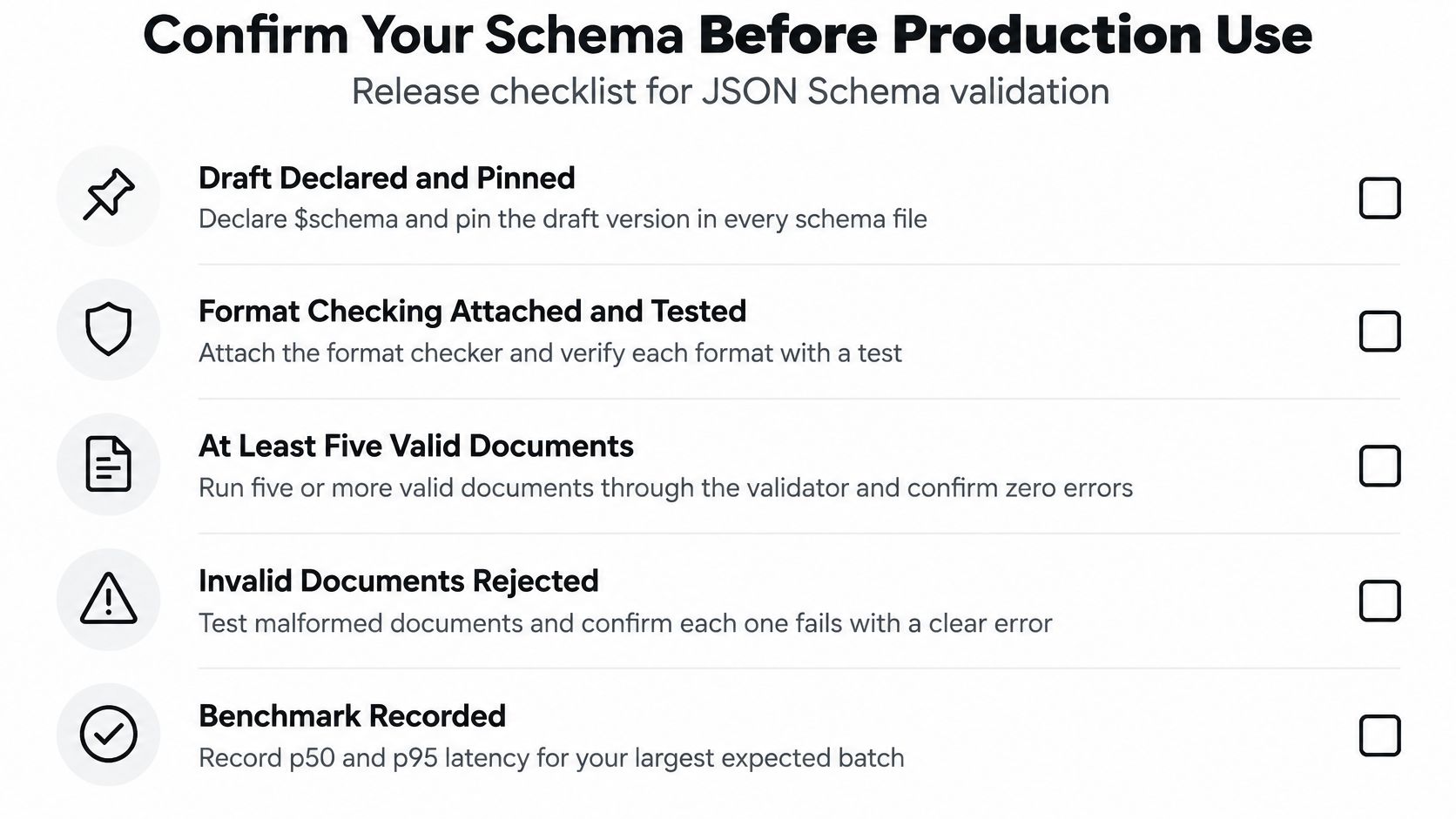
Use this checklist as your deployment gate:
- Draft and dependency pinned: Declare the intended dialect and commit the tested package version.
- Formats exercised: Verify accepted and rejected examples for every active format.
- Representative fixtures tested: Run at least five valid and five invalid sample documents as a starting test set, then add actual edge cases.
- Unknown keys rejected: Confirm unexpected fields fail at the intended object boundary.
- Observability ready: Attach document identifiers, record benchmark results, and assign reviewers.
Connect extraction to controlled downstream actions
At Matil, users define custom extraction schemas with field names, types, and descriptions, then receive structured JSON following that definition. Matil isn't just OCR: its platform combines extraction, classification, validation, and chained operations. That output becomes input to your application validator before an ERP or payment system receives it.
The client retains all rights over uploaded documents and the resulting structured JSON. For the boundary between extraction and acceptance, use this explanation of schema validation.
Where privacy controls permit it, GoReplay's guide can help you replay production traffic in tests using sanitized requests. Start with one document type, evaluate a real sample set, and expand only after you understand its rejection patterns.
Matil offers document extraction through a simple API, with pre-trained models and customizable schemas for structured JSON workflows. If you're evaluating document automation, start with one invoice schema and test its output against your format, structural, and business checks before connecting it to downstream actions.


