Document Classification Techniques: The Complete Guide
Master document classification techniques for invoices and business docs. Compare rule-based, ML, deep learning, and modern AI extraction methods.

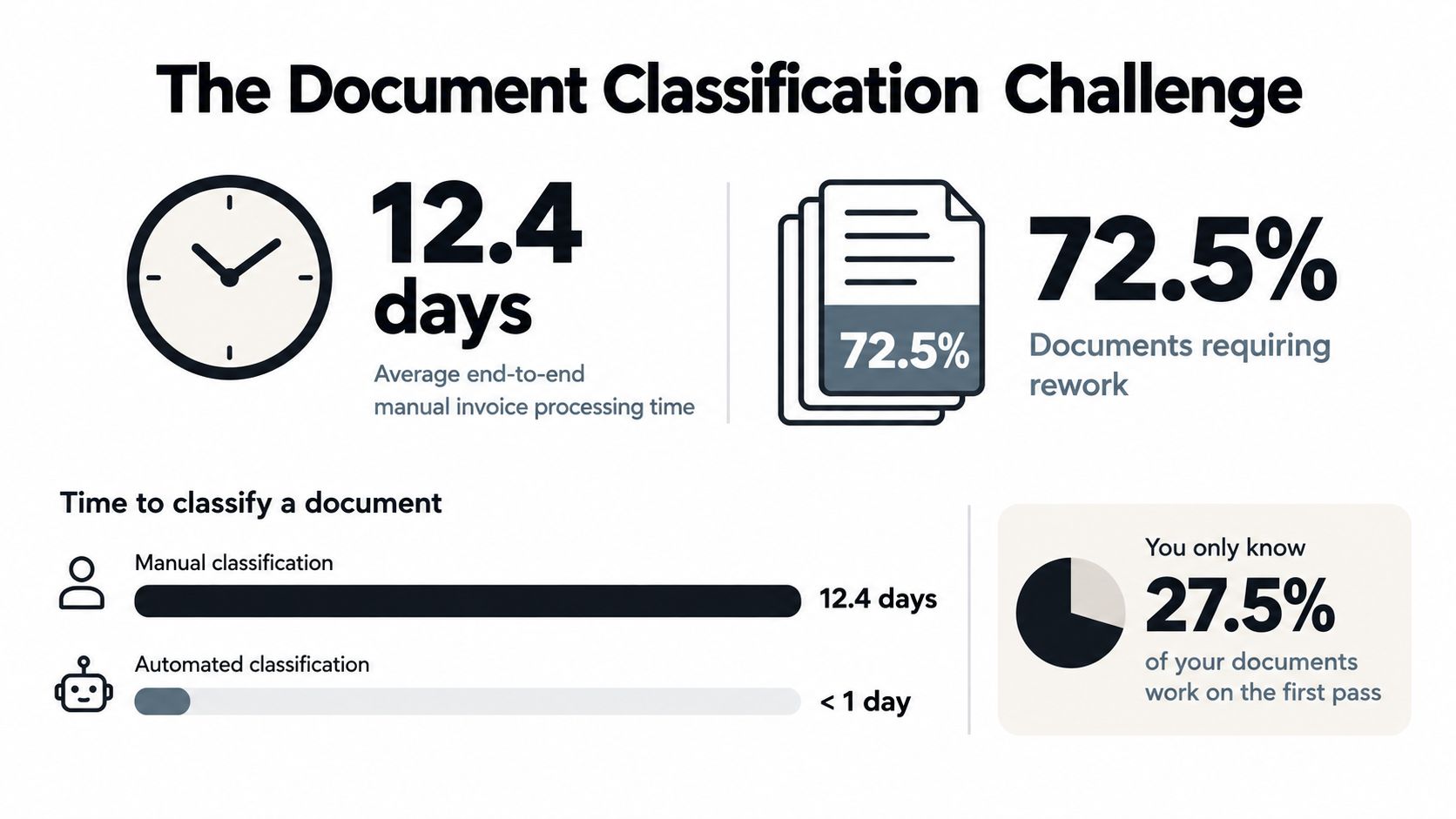
Manual invoice processing takes an average of 12.4 days per invoice, and 72.5% of invoices require rework. Document classification techniques help replace that slow first-pass sorting with a pipeline that identifies each file, chooses the right extraction logic, validates the result, and sends exceptions to a person.
That distinction matters to finance, operations, logistics, legal, and compliance teams. OCR can turn pixels into text, but it doesn't reliably tell you whether a page is an invoice, payslip, bank statement, Bill of Lading, KYC document, or contract. Document classification is the decision layer that makes OCR useful in a real workflow.
The Document Classification Challenge
Manual processing creates delays before anyone extracts a single field. A finance operator may open an email attachment, identify the document type, rename the file, copy values into an ERP, check for missing pages, and send exceptions to another queue. Repetition increases the chance of mistyped totals, incorrect routing, and delayed approvals.
The available evidence shows why automation deserves attention. Manual invoice handling averages 12.4 days end to end, some cases reach 25 days, and 72.5% of invoices require rework, according to this guide to automated invoice processing. Manual data entry also typically produces 2% to 4% error rates, with consequences for payment timing and financial reporting, as documented in this 2024 invoice extraction paper.
Why traditional OCR falls short
Traditional OCR answers a narrow question: what characters appear on this page? It doesn't necessarily answer:
- Is this a supplier invoice or a credit note?
- Does this payslip belong to the current employee?
- Where does one document end inside a mixed PDF?
- Should this page go to accounts payable, KYC review, or customs operations?
- Can the extracted value be trusted?
OCR-only performance varies with scan quality, handwriting, skew, fonts, and page structure. One technical comparison reports around 80% accuracy for Pytesseract on real-world documents, compared with approximately 98% for Google Vision OCR on mixed printed, media, and handwritten datasets. At 80% accuracy, one in five documents still needs manual correction, according to this PDF classification API guide.
Document classification is the automated process of assigning a document to a meaningful business type so the system can apply the right extraction schema, validation rules, and workflow. It sits between document intake and structured output. A classifier might label a file as invoice, payslip, passport, delivery_note, or bill_of_lading, then route it to the appropriate process.
That makes classification different from extraction. Classification asks what the document is. Extraction asks which values it contains. Teams that skip the first question often send the wrong file to the wrong model, creating errors that appear later as missing fields, rejected integrations, or manual rework. The distinction becomes clearer when you compare unstructured data with structured data.
Evolution of Document Classification Methods
The history of document classification techniques starts well before modern generative AI. A 2026 survey traces the first relevant work to the mid-1960s, when researchers used mathematically derived, empirically based classification systems built on factor analysis. Instead of manually reading every document, those systems inferred meaning from the statistical distribution of words. This early idea still shapes the way modern pipelines convert document content into signals.
The classic pipeline developed around four activities:
- Feature extraction, which converts words or document properties into measurable signals.
- Dimensionality reduction, which removes unnecessary complexity from high-dimensional data.
- Classifier selection, which chooses a method for assigning labels.
- Evaluation, which tests whether the assignments are reliable.
Classical methods such as Rocchio, logistic regression, Naive Bayes, k-nearest neighbors, and support vector machines expanded the field. They worked especially well when text was reasonably clean and the available categories were defined in advance. A second survey of document image classification also identifies nearest-neighbor methods, decision trees, and neural networks as core families, showing that the field has always combined statistical pattern recognition with machine learning. These developments are summarized in the survey of document classification research.
From text signals to visual understanding
Deep learning changed the representation problem. Instead of relying only on manually selected word features, CNNs, RNNs, and hierarchical attention networks learned richer patterns from document content and, in some systems, page images and spatial relationships.
Transformers added stronger context handling. On visually rich documents, the model needs to understand that a value near a label, inside a box, or beneath a particular heading can matter more than the same word elsewhere on the page. That is why a vision-language model can be useful when text and visual structure must be interpreted together.
Modern production systems rarely depend on one generation of techniques. Rules may handle a known edge case, a classical model may process predictable high-volume documents, and a multimodal model may resolve look-alike forms. The useful question isn't whether an older method has disappeared. It's whether each method is assigned the part of the workflow it handles best.
Comparing Classification Approaches
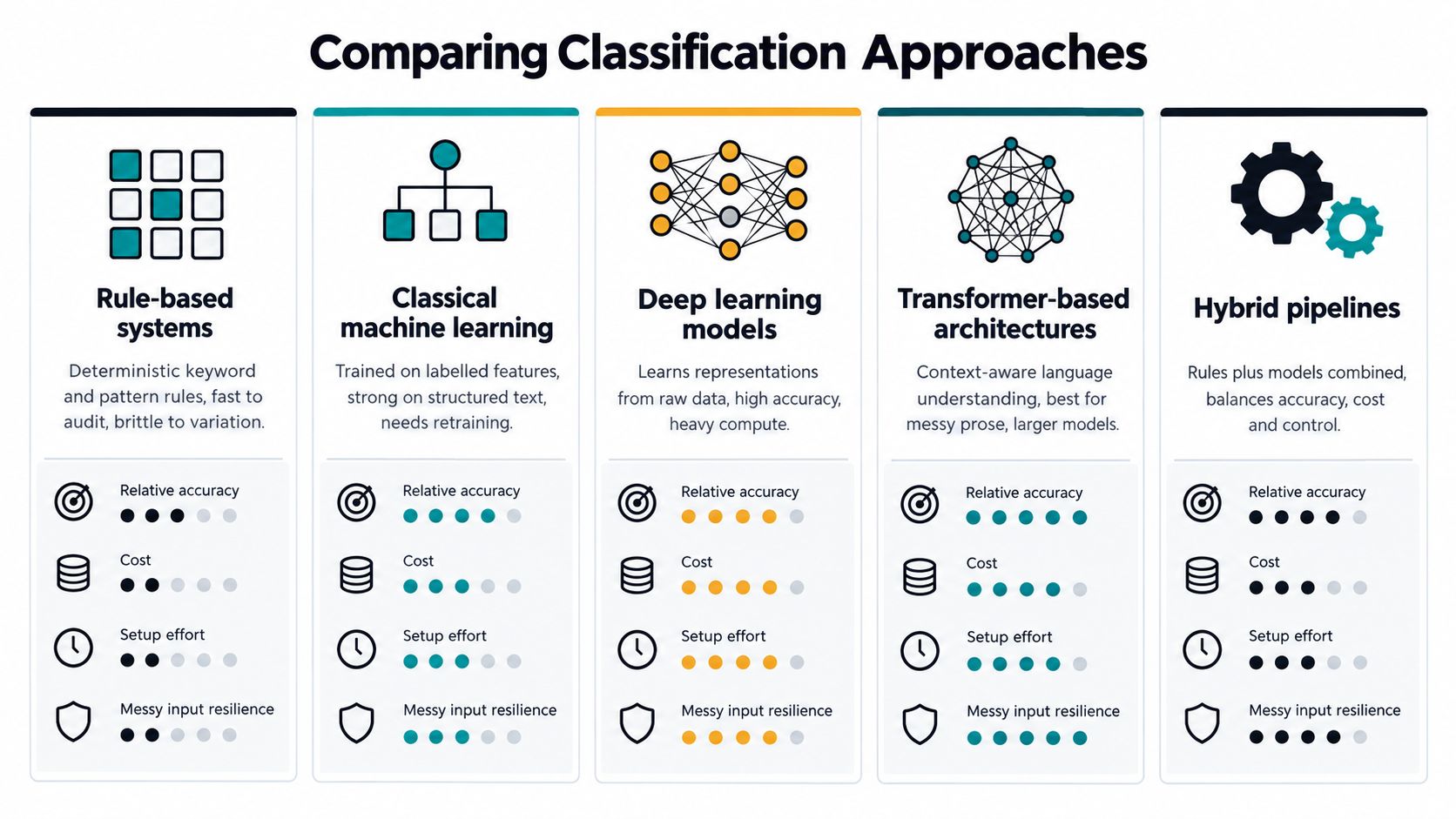
No single approach wins across every document type. A fixed invoice template has different requirements from a handwritten receipt, a multilingual identity document, or a multi-page customs packet. Teams should compare accuracy, speed, cost, explainability, training effort, and resilience to layout changes.
| Approach | Strengths | Limitations | Suitable use |
|---|---|---|---|
| Rule-based systems | Transparent, deterministic, quick to audit | Brittle when wording, vendors, or layouts change | Stable templates and explicit exceptions |
| Classical machine learning | Fast, relatively interpretable, efficient on structured text | Requires labelled examples and maintenance | Standardized document families |
| Deep learning | Learns complex representations from text, images, and layouts | Needs more data, compute, and testing | Visually varied forms and scanned documents |
| Transformer architectures | Strong contextual understanding and multimodal capability | Can increase processing cost and operational complexity | Messy prose and layout-intensive files |
| Hybrid pipelines | Combines control, speed, and richer document understanding | Requires careful orchestration and monitoring | Mixed business documents in production |
Rules and classical machine learning
Rules are useful when a document contains a dependable marker, such as a specific form identifier or a known phrase. They're also easy for an operations team to inspect. Their weakness appears when a supplier changes its template, translates a label, or sends a scan with poor OCR.
Classical machine learning methods, including support vector machines, logistic regression, Naive Bayes, decision trees, and random forests, remain practical because they can be fast and competitive with more complex models. They work well when the text features are informative and the categories are stable. They're less comfortable with sparse OCR, unusual layouts, and classes that have very few examples.
Deep learning, transformers, and multimodal systems
Deep learning models can learn patterns that rules don't describe directly. Transformer-based document models go further by combining contextual text understanding with visual or positional information. A technical overview reports that a BERT-base text-only approach reaches 89% accuracy on RVL-CDIP, while DocFormer combines a CNN visual encoder with document text signals. Recent benchmarking also indicates that specialized multimodal transformers can outperform general-purpose LLM approaches on layout-intensive document classification. These results are discussed in the Hugging Face overview of document AI.
For teams assessing AI-generated text or visual content as part of a wider verification process, verifying content in a modern world provides useful context. The same principle applies to document automation: classification quality depends on the evidence the system can inspect, not just the apparent sophistication of the model.
Multimodal systems are often the practical choice for look-alike business documents. They combine OCR text with visual layout features, which helps distinguish invoices, statements, payslips, and receipts when their vocabulary overlaps.
Building a Document Classification Pipeline
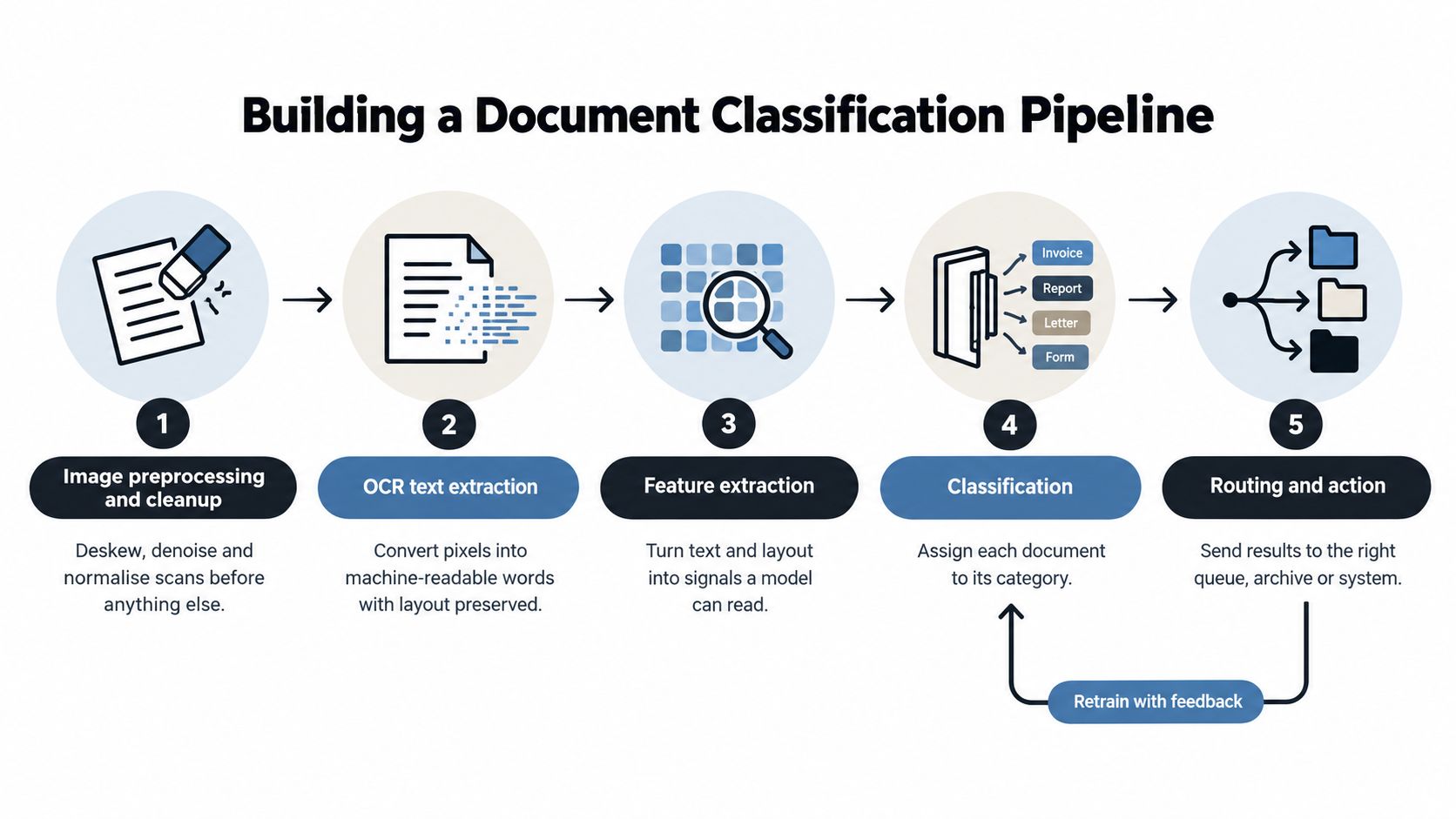
A classifier performs reliably when it operates inside a controlled document pipeline rather than as an isolated prediction endpoint. Each stage should preserve the evidence behind its decision, attach a confidence score, and define the next action when the result is uncertain. The pipeline resembles a production line: poor preparation at the start can create errors that later stages cannot fully repair.
Step 1, prepare the image
Image preprocessing addresses common problems before OCR begins. Deskewing, denoising, rotation correction, contrast adjustment, and page normalization improve the quality of both text and layout signals. A clean digital PDF may require little preparation. A fax, phone photograph, or low-quality scan may need several corrections before extraction is dependable.
Step 2, extract text with layout
OCR converts pixels into machine-readable words, but plain text alone removes useful evidence. A document AI pipeline should retain coordinates, blocks, tables, and relationships between labels and values. Position helps distinguish a phrase in a header from the same phrase in a totals area, footer, or repeated line-item region.
Step 3, construct features
Feature construction combines multiple forms of evidence:
- Text features include terms, headings, identifiers, and language.
- Layout features include coordinates, tables, columns, logos, and page geometry.
- Image features include stamps, signatures, checkboxes, and visual templates.
- Packet context includes neighboring pages and probable document boundaries.
Technical guidance on document classification workflows describes the sequence from image cleanup and OCR through feature construction, classification, and confidence scoring. A document process workflow shows how intake, packet splitting, and routing fit around those model steps. Text and layout must be read together because documents can share vocabulary while using entirely different structures.
Step 4, classify with confidence
The system assigns a label and a confidence score. A high-confidence invoice can proceed automatically to extraction, while a low-confidence page can go to review. One threshold rarely suits every class. A wrong receipt label may cause inconvenience, whereas a wrong KYC or compliance label can block a regulated process.
Practical rule: Automate the confident band, review the uncertain band, and keep an explicit path for unknown document types.
Step 5, validate and route
Validation checks whether the classification and extracted values make operational sense. Tests can cover required fields, page completeness, totals, identifiers, and expected relationships between documents. Only then should the result move to an ERP, accounting queue, archive, or human reviewer.
Mixed-format packets require packet-level controls. A single incorrect page split can place every following page in the wrong document. Downstream extraction and validation may then fail even if the page-level classifier made accurate predictions. Research on multimodal document workflows highlights this failure mode and the need to handle partially readable pages, unknown types, and multi-page documents explicitly. The broader discussion appears in this analysis of multimodal document classification.
Evaluation Metrics and Performance Benchmarks
Accuracy alone doesn't tell an operations team whether a classifier is ready for production. A model can perform well overall while misclassifying the document class that matters most to compliance or payment processing.
Use several measurements:
- Precision shows how often a predicted class is correct.
- Recall shows how many documents belonging to a class the system finds.
- F1 score balances precision and recall.
- Latency measures how long the system takes to classify a document.
- Unknown and review rates show how often the pipeline declines to automate.
- Per-class results reveal weak document types hidden by an overall average.
One documented benchmark reports a Tesseract plus SVM pipeline achieving 81.2% F1, 85.6% OCR accuracy, and 240 ms latency on RVL-CDIP. The figures come from this survey of digitized document classification. They show why OCR quality, classification quality, and response time should be tracked as separate measures.
Accuracy must be read with latency
A production pipeline has competing objectives. A complex model may improve classification but add processing time, memory requirements, and infrastructure cost. A lightweight model may respond quickly but send too many files to manual review.
A separate survival study reports a graph-embedding method reaching 90% accuracy with 12 ms classification time and a 10% error rate on CACM, and 88% accuracy with 15 ms classification time and a 12% error rate on Cranfield. These results are reported in this document classification methods study. The benchmark doesn't establish that the same method will work for every business collection. It does demonstrate the importance of evaluating accuracy and latency together.
Reduce unnecessary complexity
Documents often produce high-dimensional, sparse feature spaces. Dimensionality reduction methods such as PCA, LDA, NMF, random projection, and autoencoders can reduce time and memory complexity before classification. They don't replace evaluation. They change the computational burden the system must manage.
Set acceptance criteria by workflow risk. Finance teams may require stricter review for invoices that affect payment. Logistics teams may prioritize fast routing for standard documents while sending ambiguous customs paperwork to specialists. A useful evaluation set should include poor scans, look-alike classes, rare documents, multi-page files, and changed templates, not only clean examples.
Real-World Use Cases and Applications
The value of classification appears when a document reaches the right process without manual sorting. The same extraction engine shouldn't treat a supplier invoice, an employee payslip, and a passport as interchangeable inputs.
Invoices and accounts payable
Problem: An inbox contains invoices, credit notes, statements, receipts, and purchase orders. Sending every PDF through one extraction schema produces missing fields and unnecessary exceptions.
Solution: Classify each file first, then route invoices to the accounts payable schema, credit notes to adjustment handling, and statements to reconciliation. The workflow can validate supplier identifiers, totals, dates, and required fields before integration.
Result: Operators spend less time sorting and retyping. The process reserves human attention for exceptions instead of routine document identification.
KYC and identity documents
Problem: A KYC packet may contain an ID card, passport, NIE document, proof of address, and supporting correspondence. Each type has different fields and validation requirements.
Solution: Classification identifies the document type before the system extracts identity fields or checks completeness. A low-confidence page can go to a compliance reviewer rather than entering the wrong validation path.
Result: Compliance teams receive organized cases with clearer traceability. Missing or incorrectly typed documents become visible earlier in the workflow.
Logistics and customs
Problem: Delivery notes, Bills of Lading, packing lists, commercial invoices, and customs declarations can arrive together. They may share supplier names, shipment references, and product descriptions.
Solution: A classifier uses text, page structure, and visual cues to route each document to the correct logistics schema. Delivery notes can focus on SKU and quantities, while shipping documents can use carrier, shipment, and customs fields.
Result: Operations teams reduce manual sorting and avoid passing a delivery note into a customs extraction process. Mixed packets can be split before each document reaches its destination.
Payroll and utility documents
Problem: Payslips have a different structure from electricity and gas bills, yet both may contain names, addresses, dates, and account identifiers. A generic OCR process can confuse their fields.
Solution: Classification sends payslips to payroll extraction and utility bills to schemas designed for values such as CUPS codes, power capacity, and consumption. Validation then checks whether the expected fields are present for that document class.
Result: Finance and operations teams receive structured output that matches the next business action. The same pattern also applies to bank statements, insurance policies, purchase receipts, contracts, and legal records.
Data Labeling and Model Training Strategies
A supervised classifier learns from labelled examples. Those examples need to represent the variation the system will encounter, including different vendors, countries, template versions, scan qualities, languages, and page counts.
The cold-start problem appears quickly. A company may have abundant invoices but very few credit notes, customs forms, or newly introduced supplier templates. A model trained on historical documents can also weaken when vendors redesign their forms. New layouts change the relationship between text and visual structure, even when the underlying business fields remain the same.
Choosing a training path
Supervised learning offers predictable behavior when each class has representative examples. It works well for stable, high-volume categories and supports clear per-class evaluation.
Transfer learning starts with a model that has already learned general document or language patterns. The team adapts it to a narrower business taxonomy instead of building every representation from scratch.
Domain adaptation helps when the target documents differ from the data used to develop the original model. The adaptation process should include local scans, terminology, layouts, and exception patterns.
Zero-shot classification reduces dependence on labelled training examples by asking a model to select from described categories. A 2026 paper proposes zero-shot document classification as a configurable approach for non-technical users, as described in this coverage of document classification methods.
Zero-shot methods can shorten setup, but they don't eliminate governance. Teams still need a label definition, confidence policy, audit trail, test set, and drift monitoring. A promptable system can make a fast decision, but production owners remain responsible for proving that the decision is consistent and safe.
Manage change deliberately
Keep reviewer corrections as structured feedback. Track which classes generate the most uncertainty, which templates produce errors, and whether the unknown category is growing. Retraining should respond to observed drift rather than happen without a defined quality target.
The strongest workflow connects intake, OCR, classification, extraction, validation, and structured output. Training strategy matters, but it can't compensate for a pipeline that loses page boundaries or routes low-confidence predictions without review.
Deployment and Scaling Considerations
A prototype can classify clean sample files. Production must handle email attachments, scanned PDFs, images, mixed packets, corrupted pages, new vendors, and documents that don't belong to any known class.
An API-based design gives technical teams a practical integration point. The application can submit a PDF or image, receive classification and extraction results, and pass validated fields into an ERP, CRM, accounting platform, case-management system, or data warehouse. A no-code upload interface can support business teams, while developers retain control over schemas, authentication, retries, and observability.
Protect the workflow from bad predictions
The critical question isn't just which model has the highest raw accuracy. It's how the system prevents one bad split, low-confidence page, or unknown document from poisoning downstream work.
Use layered controls:
- Packet handling: Detect document boundaries before routing pages to extraction.
- Confidence thresholds: Send uncertain predictions to human review instead of forcing a label.
- Fallback logic: Use rules, a second model, or manual triage for unsupported document types.
- Validation gates: Block incomplete or inconsistent results before they reach financial or compliance systems.
- Active learning: Add corrected review cases to the evaluation and improvement process.
- Drift monitoring: Watch confidence, class distribution, unknown documents, and per-class quality as templates change.
This approach is especially important for finance, logistics, and KYC. A fast wrong decision can create more work than a slower, controlled exception. The system should make uncertainty visible rather than hide it behind a confident-looking JSON response.
Security and operational controls
Enterprise buyers should evaluate more than model output. They need clear policies for data retention, access control, auditability, incident handling, and regulatory requirements. Relevant expectations can include GDPR, ISO 27001, and AICPA SOC controls, depending on the organization and jurisdiction.
Matil combines advanced OCR, classification, validation, and workflow orchestration through an API. It offers pre-trained document models, flexible schemas, rapid customization, PDF splitting, and routing for documents such as invoices, payslips, KYC files, delivery notes, utility bills, bank statements, receipts, insurance policies, Bills of Lading, and customs declarations. Its stated product capabilities include precision above 99% in multiple use cases, API integration, GDPR, ISO 27001, AICPA SOC, and zero data retention, so buyers should validate the applicable scope and current terms during procurement.
The right deployment decision follows the document mix. Use rules where formats are consistently stable, classical models where text is predictable, and multimodal or hybrid pipelines where layout carries meaning. Evaluate the complete path from intake through splitting, OCR, classification, extraction, validation, review, and integration. Optimizing one component won't fix a broken workflow.
If you're evaluating document automation, Matil offers an API that combines advanced OCR, document classification, validation, PDF splitting, and workflow orchestration for structured output. Visit Matil to explore how it can help your team classify mixed documents, route each type to the right schema, and reduce manual processing in finance, operations, logistics, legal, and compliance.


