Document Classification Software Guide
Discover how document classification software automates data extraction and routing. Learn core AI tech, real use cases, and how to choose the right API.

A finance team receives a single PDF containing an invoice, a delivery note, and a customs declaration. An operations analyst opens it, separates the pages, renames each file, identifies the document type, and enters key fields into different systems. By the time the packet reaches validation, the process has already consumed time and created opportunities for misrouting.
Document classification software addresses that first decision. It identifies what each file or page represents, then routes it to the right extraction model, validation rule, and workflow. That makes it a practical foundation for OCR documents, extracting data from PDFs, and broader document processing automation.
The Reality of Document Classification Software
Document classification software determines whether an incoming file is an invoice, payslip, identity document, contract, Bill of Lading, customs declaration, receipt, or another business record. Modern platforms can use text, layout, visual structure, and context, rather than relying only on a keyword such as “invoice” or “passport.”
That distinction matters because enterprise documents rarely arrive as clean, isolated files. Teams receive scans, mobile photographs, digital PDFs, multi-page packets, duplicate attachments, and documents from different countries. A reliable classifier must recognize the document type even when the template changes, the scan quality drops, or several document types appear in one upload.
Practical rule: Treat classification as a routing decision, not as a filing exercise.
Classification is the first layer of intelligent document processing, or IDP. The broader pipeline typically ingests a document, identifies its type, extracts relevant fields, validates the result, and sends structured information into a business workflow. Classification determines which rules and fields should apply next.
Why the category has become operational infrastructure
Document classification software sits inside a wider IDP market that was estimated at USD 10.41 billion in 2025 and is projected to reach USD 88.91 billion by 2034, with a projected 26.8% CAGR, according to Fortune Business Insights' intelligent document processing market analysis. North America represented 46.01% of that market in 2025, another indication that classification is now embedded in enterprise automation rather than treated as an isolated experiment.
The same market source describes growth from USD 13.33 billion in 2026 to USD 88.91 billion in 2034, a projection that reflects adoption across finance, operations, compliance, and customer onboarding workflows. These figures describe IDP as a whole, not classification software alone, but they show the commercial context in which document classification is being deployed.
The operational question has therefore changed. Teams aren't asking only whether software can label a clean invoice. They need to know whether it can classify mixed packets, split files correctly, handle unknown document types, and route low-confidence results for review without stopping the entire process.
What classification must handle in production
A useful system should support:
- Mixed packets: Separate invoices, receipts, and delivery notes when they arrive in one file.
- Multi-page logic: Keep pages belonging to one document together while separating unrelated pages.
- Fallback categories: Send unfamiliar documents to an “other” or review queue instead of forcing an incorrect label.
- Confidence thresholds: Distinguish between automatic routing and human review.
- Workflow-specific outputs: Trigger the right extraction fields and validation rules after classification.
The best implementation isn't the one with the most impressive demo. It's the one that makes the next operational step reliable.
Why Traditional OCR and Manual Routing Fail
Traditional OCR answers a narrow question: what characters appear in this image? It converts scanned content into machine-readable text, but it doesn't understand whether that text belongs to an invoice, passport, delivery receipt, or contract. That missing context is why OCR alone can't solve document classification.
A basic rule might route a file whenever it finds “invoice number.” That approach works until a purchase order contains the same phrase, a credit note uses a different label, or a scanned document produces imperfect text. Manual routing then becomes the safety net, and the safety net becomes the bottleneck.
Manual entry also introduces an operational error rate that teams can't dismiss. One industry summary places typical manual data-entry errors between 1% and 4%, or 1 to 4 wrong fields per 100 entries, as reported in this analysis of manual data-entry and document-processing risks. Invoices, identity records, and customs paperwork often pass through multiple downstream checks, so a small field error can create rework, payment delays, or an audit exception.
The hidden cost of getting the first decision wrong
A misclassified document can activate the wrong extraction schema. An invoice sent through a logistics workflow may lose supplier and tax fields. A passport sent through a generic identity workflow may bypass the checks required for a KYC process. A contract routed as a routine attachment may never reach legal review.
That creates a cascade:
- The file enters the wrong queue.
- The wrong fields are extracted or ignored.
- Validation rules produce false failures or miss real errors.
- A person investigates the exception and corrects the record.
- The downstream system receives data late or in the wrong format.
Teams looking for a manual first step can use a practical guide on how to OCR a PDF, but converting a PDF to text is only ingestion. It doesn't replace classification, contextual validation, or workflow routing.
OCR quality also affects every later stage. Skewed scans, low contrast, handwritten annotations, stamps, and unusual layouts can corrupt the text before a classifier sees it. Improving the first layer helps, but production systems still need confidence scoring and a controlled fallback path.
A mature design doesn't pretend that every document can be processed without review. It makes uncertainty visible, isolates exceptions, and prevents one difficult packet from blocking a high-volume queue.
How AI and Machine Learning Power Classification
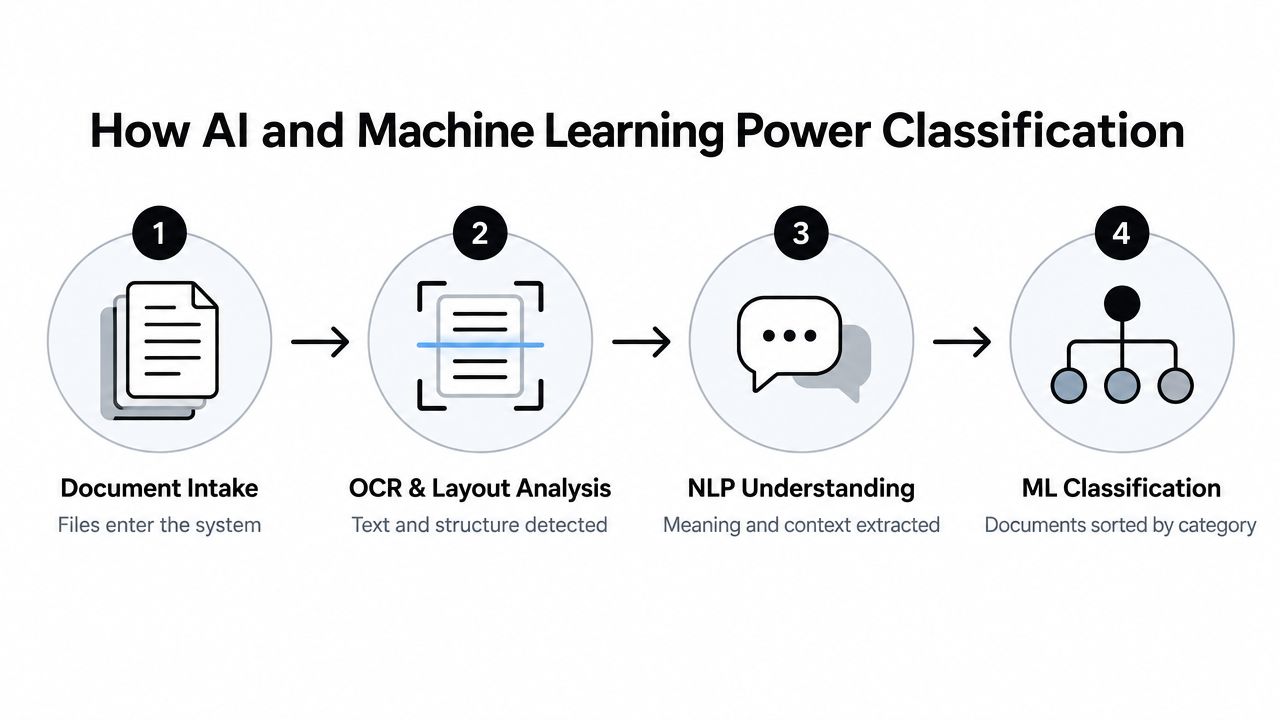
A dependable classification pipeline combines several capabilities. OCR reads the page. Layout analysis identifies structure. Natural language processing interprets meaning. Machine learning assigns a document category. The system can then apply the extraction and validation logic associated with that category.
Step 1 starts with better document intake
The system ingests PDFs, scans, images, and multi-page files. It normalizes orientation and prepares the page for analysis. If the source image is poor, later models have less reliable evidence, so image quality and OCR configuration directly influence classification.
Step 2 combines text with layout
A document isn't defined only by its words. An invoice may contain a supplier block, line-item tables, totals, tax identifiers, and payment terms arranged in a recognizable structure. A payslip may contain employee details, earnings, deductions, and period information in a different visual pattern.
Layout-aware processing became more important with the RVL-CDIP document-classification benchmark. Introduced in 2015, RVL-CDIP contained 400,000 document images across 16 categories. Earlier text-classification baselines such as 20 Newsgroups contained about 20,000 news items across 20 topics and 26,214 unique words. RVL-CDIP helped move the field from purely text-based classification toward page-image and layout-aware document understanding.
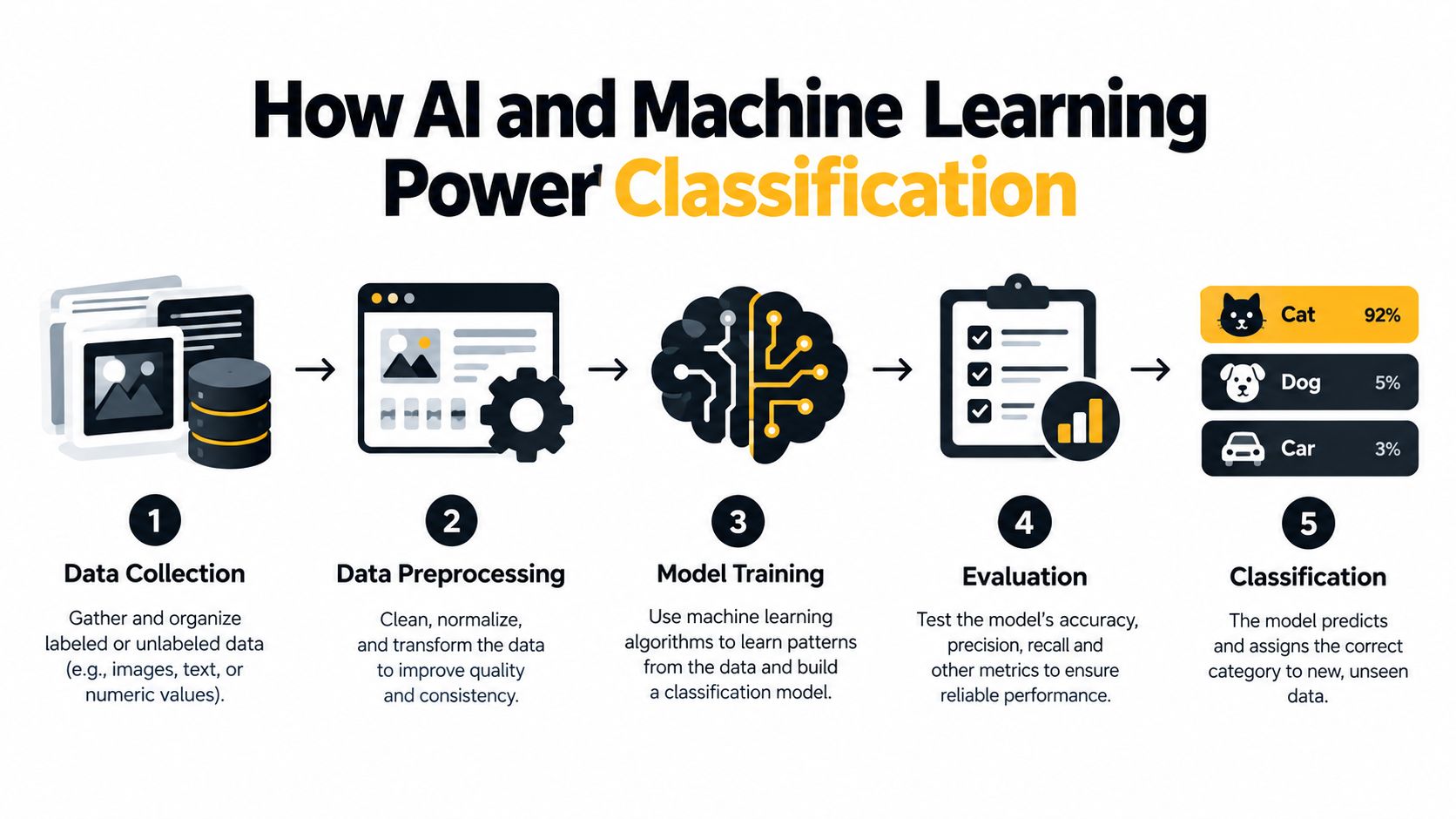
Step 3 balances confidence and latency
Production teams must decide how much processing time is acceptable for a given confidence level. A benchmark comparison on RVL-CDIP reported that a Tesseract plus SVM pipeline achieved 81.2% F1, 85.6% OCR accuracy, and 240 ms latency. A Google Cloud Vision plus CNN pipeline reached 88.9% F1, 94.2% OCR accuracy, and 420 ms latency, according to the published OCR and machine-learning comparison.
The practical lesson isn't that one stack always wins. Higher-quality OCR and image models can improve classification outcomes, but they may also increase end-to-end processing time. A real workflow should route high-confidence documents automatically, send ambiguous cases to review, and measure throughput alongside accuracy.
Step 4 chooses models based on the document signal
Transformers aren't automatically the best choice. In a controlled PDF classification study, a Random Forest model outperformed BERT and SVM across accuracy, F1, precision, and recall, reaching 0.841 accuracy and 0.838 F1, as documented in the IDEAL 2024 study. This suggests that layout, formatting, and metadata can sometimes carry more useful signal than long semantic context.
Model selection should follow the document mix. Simple, consistent classes may work well with lightweight approaches. Visually variable or multilingual documents may need richer image and language analysis. Either way, test against your actual files, not a curated sample.
The Modern Approach to Extraction and Validation
Classification is necessary, but it isn't the finished workflow. The modern approach connects OCR, classification, extraction, validation, and orchestration so that the system can make a useful business decision from the document.
A mixed packet illustrates the difference. The input may contain an invoice, a delivery note, and a customs declaration. A classification-only system labels the pages. A complete pipeline splits the packet, identifies each document, applies the correct schema, checks values against business rules, and sends each result to the appropriate ERP, transport platform, or compliance queue.

What a production pipeline should do
A practical sequence looks like this:
- Ingest: Accept a PDF, image, scan, or multi-page upload through an API.
- Detect and split: Identify page boundaries and separate mixed document packets.
- Classify: Assign each document to a defined category, with an “other” path for unknown material.
- Extract: Select fields based on the detected document type.
- Validate: Check formats, relationships, required values, and business rules.
- Review exceptions: Send low-confidence or contradictory results to a human queue.
- Orchestrate: Push approved structured data into the next system or workflow.
Matil.ai is one example of this API-first approach. Its API combines advanced OCR, classification, validation, PDF splitting, and workflow orchestration, while its data-structure and validation controls let teams define the output they need without relying solely on long model-training cycles. It offers pre-trained models for documents such as invoices, payslips, identity records, bank statements, receipts, delivery notes, Bills of Lading, and customs declarations.
The platform describes accuracy above 99% in multiple use cases, together with pre-trained models, rapid customization, and JSON outputs with traceability. Those capabilities should still be tested against an organization's own document set, especially when files are multilingual, handwritten, or structurally inconsistent.
Why validation belongs beside classification
Extraction can be syntactically correct and still be operationally wrong. A date may have a valid format but belong to the wrong field. A total may be readable but fail to reconcile with line items. An identity document may contain a name that doesn't match the onboarding record.
Validation creates the second decision layer. It can compare extracted values with expected formats, reference data, or relationships between fields. It can also assign confidence and preserve the evidence needed for a human reviewer.
The result is less brittle than a chain of disconnected OCR scripts, folder rules, and manual checks. Teams can change a document category, add a field, or adjust a validation rule without rebuilding the entire ingestion process.
Real Enterprise Use Cases and Applications
The value of document classification software becomes clearer when the category determines the next action. The same upload mechanism can support several departments, but each document type needs different fields, checks, and destinations.
Finance and accounts payable
Problem: An accounts-payable team receives invoices, credit notes, receipts, and purchase orders through shared inboxes and supplier portals. Staff sort the files, enter supplier details, capture totals, and investigate missing information.
Solution: The classifier identifies the document type, selects the relevant invoice or receipt schema, extracts supplier details, dates, totals, tax information, and payment terms, then applies validation before sending the record to the approval workflow.
Result: The team spends less time on sorting and rekeying. Exceptions become visible as structured work rather than being discovered after payment processing has already stalled.
Manual invoice processing carries a measurable economic gap. IBM cites an industry study in which mature, highly automated accounts-payable pipelines took about 3 days per invoice, compared with a 17-day average for less automated organizations, and processed each invoice at less than a quarter of the cost, as described in IBM's automated invoice processing overview.
Payroll and human resources
Problem: Payslips and employment documents arrive in different formats, often from several entities or payroll providers. A generic OCR workflow may capture text without knowing which values represent net pay, deductions, employee identifiers, or the pay period.
Solution: Classification selects the payslip model and applies fields specific to payroll records. Validation can flag missing identifiers, inconsistent periods, or values requiring review before the data reaches an HR or finance system.
Result: Payroll teams receive structured records without manually interpreting every layout. Sensitive documents can follow a controlled review and access path.
KYC and compliance
Problem: A compliance team receives identity cards, passports, residence documents, bank statements, and supporting records. These files differ by country, language, template, and image quality.
Solution: The system classifies the document and applies the correct extraction and validation logic. It can route identity records to KYC checks, bank statements to proof-of-address review, and unknown documents to a compliance queue.
Result: Reviewers focus on ambiguous or exceptional cases instead of performing the same initial sorting for every applicant. Traceability also improves because the workflow can preserve the classification, extracted values, confidence, and review action.
Logistics and customs
Problem: Freight operations handle Bills of Lading, delivery notes, packing lists, invoices, and customs declarations. A single shipment packet may combine several of them, and the relevant fields differ sharply between documents.
Solution: Classification separates the packet and sends each document to the appropriate extraction schema. The workflow can capture shipment references, SKUs, quantities, consignee details, customs information, and transport data, then deliver the results to logistics systems.
Result: Operations teams reduce manual packet handling and gain a consistent route from scanned paperwork to structured shipment data.
Evaluating Vendors and Measuring ROI
A vendor demo often uses clean files and a small set of predictable categories. That isn't enough. Evaluation should use representative packets, poor scans, multilingual samples, unfamiliar templates, duplicate pages, and documents that belong in an “other” category.
Compare the full operating model
Ask vendors to demonstrate:
Edited Paragraph:
- Classification quality: Can the system distinguish similar document types using both content and layout?
- Packet handling: Can it split a mixed multi-page PDF while preserving document boundaries?
- Confidence controls: Can you set thresholds and send uncertain results to human review?
- Extraction continuity: Does classification trigger the correct schema and validation rules?
- Integration effort: Is there a usable API, webhook, SDK, or no-code path for your systems?
- Language coverage: Can it process the languages, regional formats, and document variants you typically receive?
- Traceability: Can reviewers see the source evidence, extracted value, confidence, and correction history?
Security is part of the technical evaluation, not a procurement afterthought. For sensitive finance, KYC, legal, and payroll documents, check GDPR, ISO 27001, AICPA SOC, encryption, access controls, audit trails, retention settings, and the provider's data-processing terms. Matil.ai specifies GDPR, ISO 27001, AICPA SOC, and a zero data retention policy as part of its enterprise offering.
Build the business case from your baseline
Use your own document volume, handling time, exception rate, and labor cost. Then compare the current process with the cost of API calls, implementation, monitoring, human review, and system maintenance.
Hyland cites Ardent Partners data showing an average invoice-processing cost of $9.40, compared with $2.78 for best-in-class teams, a 70% reduction. The same source reports 3.1 days for best-in-class invoice processing versus 17.4 days for other organizations, in Hyland's AP automation ROI analysis.
| Metric | Average Manual Processing | Best-in-Class Automation |
|---|---|---|
| Invoice processing cost | $9.40 | $2.78 |
| Processing time | 17.4 days | 3.1 days |
These figures provide a reference point, not a guarantee for every deployment. Your calculation should include the percentage of documents processed automatically, the share sent to review, the cost of errors, and the value of faster downstream decisions.
A strong pilot measures more than model accuracy. Track classification accuracy by document type, packet-splitting accuracy, field-level extraction quality, review rate, processing latency, exception causes, and successful delivery into the target system.
Scaling Your Document Workflows
Scaling document workflows isn't about adding more rules to a shared inbox. It means replacing a sequence of manual decisions with a controlled pipeline that can accept varied inputs, identify their type, extract the relevant data, validate the result, and route exceptions.
The design should remain understandable to the people who operate it. Finance teams need to know why an invoice was held. Compliance reviewers need evidence for a classification decision. Developers need stable API responses and clear failure states. Operations leaders need reporting that separates automated throughput from human intervention.
A useful rollout starts with one document family and one measurable workflow. Invoice processing, delivery-note capture, or KYC intake can provide a contained environment for testing schemas, thresholds, validation rules, and integrations. Once the exception patterns are understood, teams can expand to adjacent document types without hiding complexity inside a growing collection of scripts.
What sustainable automation includes
- Clear categories: Each label has a practical definition and an explicit fallback path.
- Human review by design: Low-confidence results become manageable queues, not silent failures.
- Versioned rules: Changes to fields and validations can be tested and rolled back.
- System integration: Structured results reach the ERP, CRM, TMS, or compliance platform without duplicate entry.
- Operational monitoring: Teams can see latency, failures, review volumes, and recurring document problems.
This is the difference between OCR as a utility and IDP as an operating capability. OCR reads the page. Classification decides what the page is. Validation checks whether the result makes sense, and orchestration turns that result into an action.
Teams planning the integration should map the complete document process workflow, including intake, classification, extraction, validation, exception handling, and delivery. If you're evaluating an API-first platform, test it on the documents that currently consume the most manual time, not only the files that look good in a demo.
If you're evaluating document classification software, Matil combines OCR, classification, validation, PDF splitting, and workflow orchestration through an API designed for mixed document sets. Visit Matil to explore how it can turn invoices, KYC files, logistics documents, and other unstructured inputs into structured, traceable workflow data.


