Adobe PDF Extract API vs Alternatives: A 2026 Comparison
Compare Adobe PDF Extract API with Azure, AWS Textract and Matil on accuracy, tables, limits, pricing and security, with a clear fit for each case.

What happens after the Adobe PDF Extract API returns clean JSON from a demo invoice? That's the question most comparisons skip. A table can look perfect and still leave your team mapping fields, checking totals, and chasing exceptions by hand. I judge extraction tools by that second half of the job, including validation, exception handling, and volume limits, because that's where finance and operations teams save time or lose it.
How Adobe PDF Extract API Compares With Alternatives
Adobe PDF Extract API is a document-structure service, not a finished field-extraction product.
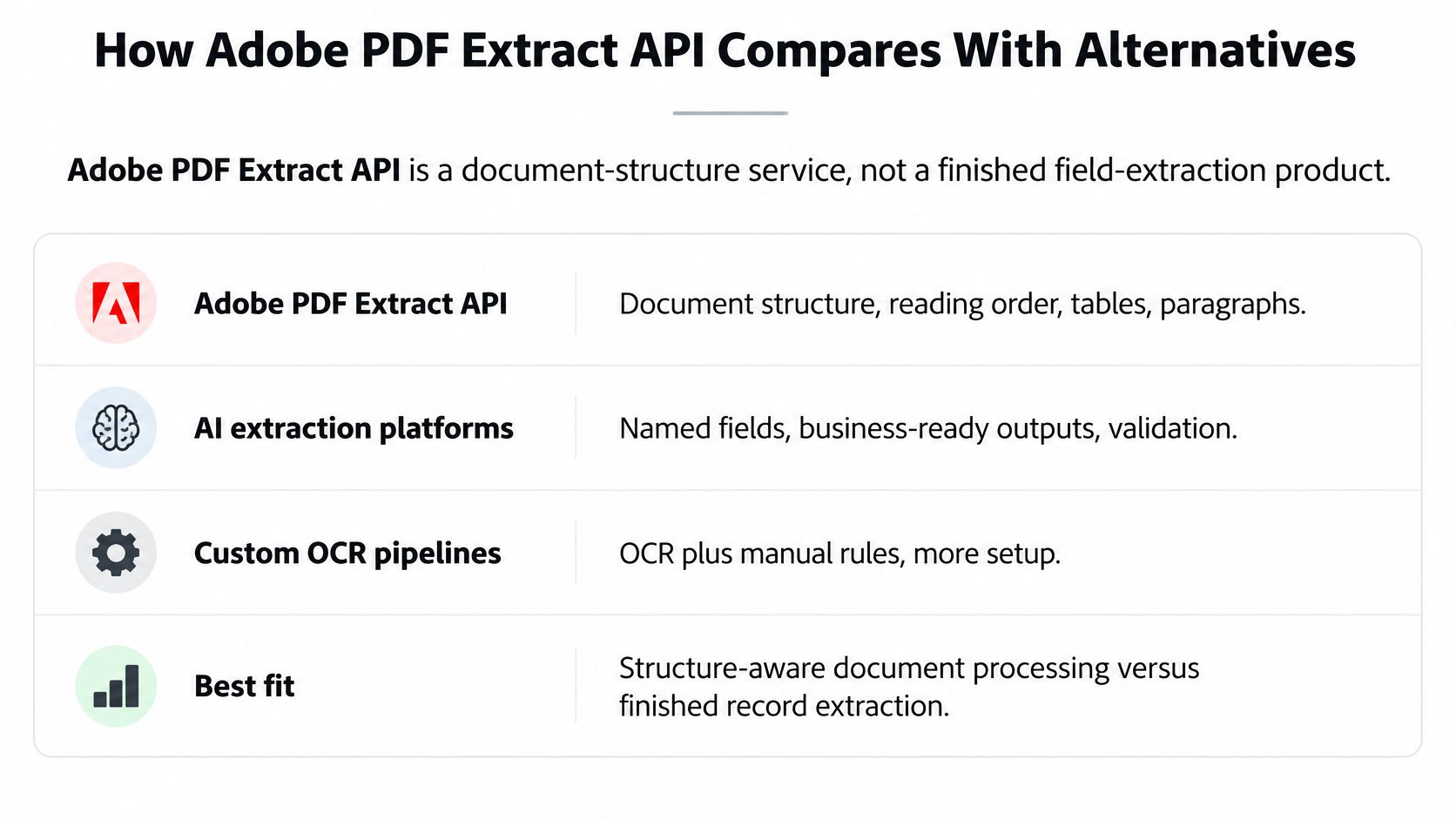
The Adobe PDF Extract API documentation describes a service using Adobe Sensei to identify paragraphs, headings, lists, and footnotes, preserve natural reading order, parse tables at cell level with row and column spans, and return optional CSV, XLSX, and PNG renditions. That is layout. It isn't an invoice total ready for your ledger.
| Option | Strongest at | Output | Business fields out of the box | Pricing model | Best fit |
|---|---|---|---|---|---|
| Adobe PDF Extract API | Document structure and layout | JSON, plus optional CSV, XLSX and PNG | No, you map fields yourself | Per document transaction, 500 free per month | Layout-aware pipelines and custom parsing |
| Matil | Field extraction with classification and validation | Structured JSON and filled Excel or PDF templates | Yes, pre-trained models for invoices, payslips, KYC and logistics | Usage rate per document structure | Finance, KYC and logistics workflows at volume |
| AWS Textract | OCR, forms and tables | JSON blocks for text, key-value pairs and tables | Partial, with prebuilt expense and ID analysis | Pay per page, varies by feature | Teams already running on AWS |
| Azure AI Document Intelligence | OCR with prebuilt and custom models | JSON fields and tables | Yes, prebuilt invoice, receipt and ID models | Pay per page, varies by model | Teams already running on Microsoft Azure |
| Google Document AI | Specialized processors for document types | JSON entities and text | Yes, for supported document types | Pay per page, varies by processor | Teams already running on Google Cloud |
| Open-source libraries (pdfplumber, PyMuPDF, Unstructured) | Text and layout extraction on native PDFs | Raw text, coordinates and tables | No | Free licence, you pay for compute and engineering | Engineering teams with bespoke documents |
Shortlist two options that match your output needs. Test both on your own documents before you commit.
Accuracy and Multi-Page Table Handling
Accuracy starts with input quality, not branding. NIST testing of OCR across three document-image sets found recognition error rates varied from 1% to as high as 74% as printed-document and image quality degraded. That range should change how you evaluate every vendor. A crisp digital PDF and a skewed phone photo of a delivery note aren't the same workload, and a single headline accuracy figure can't cover both.
How Each Option Handles Degraded Input
Adobe processes native and scanned PDFs and parses complex tables at cell level. That helps when a supplier invoice uses merged cells or multi-column layout. Adobe also warns that effective limits can drop when documents contain many tables or unusually complex layouts, so dense financial statements need testing, not assumptions. You'll still need your own checks to decide whether a value is trustworthy enough to post.
Field-focused platforms usually return a confidence score per field. That's operationally useful. You can auto-approve high-confidence totals, route low-confidence tax IDs to a reviewer, and log why a document stopped. Matil reports accuracy above 99% in several use cases. Treat that as a claim to verify on your documents, not as a benchmark you can import into your business case.
AWS Textract, Azure AI Document Intelligence, and Google Document AI also expose confidence information and handle tables, forms, and key-value pairs. Their results vary by document type and by whether you use a prebuilt model or a custom one. A prebuilt invoice model can perform very differently on utility bills, freight documents, or payslips with dense deductions.
Open-source libraries such as pdfplumber, PyMuPDF, and Unstructured work well on native digital PDFs where text and coordinates already exist. On scans, they need a separate OCR engine, image cleanup, and your own logic for reading order. They give you control, but they also give you every failure mode to manage.
For a broader view of how confidence routing and review queues fit into a pipeline, strategies for intelligent document automation from Magnitude Marketing is a useful companion read. It helps frame extraction as one step in a controlled workflow, not as a standalone conversion.
Tables That Break Across Pages
Multi-page tables expose weak tools quickly. Say a statement has a line-item table starting on page one and continuing on page two without repeating the header. If the extractor loses reading order or coordinates, rows can detach from columns, totals can land in the wrong section, and the last row on page one may not connect to the first row on page two.
Check the page break first. If a tool can't prove where a continued row belongs, don't trust its summary total.
Test this explicitly. Select documents where a table splits mid-row group, where a header repeats, and where it doesn't. Compare row counts against the source PDF. Then reconcile extracted line items against the document total. A tool that returns pretty CSV files but drops two rows at a page break will create silent accounting errors.
A Test Plan You Can Actually Run
I would build a 100-document sample before any procurement decision. This is a hypothetical test set size, chosen so the arithmetic is manageable. Split it by scan quality, page count, and table density. Include clean digital invoices, poor scans, long statements, and documents with merged cells.
- Measure at field level: Score invoice total, date, tax ID, and line-item quantity separately, not as pass or fail per document.
- Track corrections: Count how many fields a reviewer changes and how long each correction takes.
- Record failures: Log timeouts, split requirements, and documents that return incomplete tables.
That approach aligns with the kind of evidence you should demand from any OCR accuracy comparison. Field-level results tell you where automation is safe. Document-level averages hide the one field that causes payment errors.
Classification, Validation and Customization
Structured JSON is not the same as a business record. That's the central distinction in this comparison. Adobe returns headings, paragraphs, lists, tables, styling, and position. It doesn't return a validated invoice total, tax ID, CUPS code, SKU quantity, or DUA field that's ready for finance, logistics, or compliance to use without further work.
The AI document processing explained by MakeAutomation resource makes a similar point in general terms. Document processing becomes useful when extraction connects to classification, validation, and downstream action. Your team doesn't get paid for extracting text. It gets value when a correct record enters the next system without manual repair.
| Processing layer | Adobe PDF Extract API | Field-focused platforms | Build in-house |
|---|---|---|---|
| OCR for scanned pages | Yes | Yes | Yes, with an engine you choose |
| Layout, tables and reading order | Strong, cell-level | Present, depth differs by vendor | Tied to the library you pick |
| Document classification | No, you build it | Yes | You build it |
| Field schema, such as totals, CUPS codes or DUA fields | No, you map fields | Yes | You build it |
| Validation and cross-field checks | No | Yes | You build it |
| Confidence routing and human review | No | Usually | You build it |
| Traceability to page coordinates | Character bounding boxes | Present, format differs by vendor | Set by your design |
The Layers After Extraction
First, you need classification. Mixed batches are normal. One upload contains an invoice, a delivery note, and a payslip. If you can't separate and label them automatically, someone sorts them before extraction even starts. Our partitioner separates a PDF containing multiple documents into each document automatically, using page-level detection to find where each one starts and ends. Our compositor then chains operations in one pipeline, classifying first and routing each category to its own extraction schema in a single API call.
Next, you need a schema. A schema names the fields you care about, their types, and what they mean. Users can create custom extraction schemas by specifying field names, types and descriptions, and receive structured JSON that follows that definition. A Document Structure is a predefined data extraction schema, such as "Electricity Invoice", that determines what information is obtained from a document. If you're defining these rules yourself, schema validation is the discipline that stops free text from drifting into your ERP.
Then you need validation. Does the total equal the sum of line items plus tax? Does the date fall in an allowed range? Does an identity number match the expected format? Does a CUPS code have the right structure? These checks catch errors that OCR confidence alone won't catch. A value can be read clearly and still be wrong for the record.
Skipping that layer has a measurable cost. A Nordic study of 100 companies using 2020 accounts-payable data estimated 107,845 erroneous invoices, equivalent to 0.52% of all invoices handled, with finance teams spending an estimated 22.5 working days per organization correcting these errors and average losses of €0.59 per processed invoice. You don't need a large error rate to create a large correction workload.
Customization Effort and Maintenance
Azure and Google custom models generally need labelled samples and training work from your team. That's reasonable if you have ML capacity and stable templates. It's slower if every carrier, supplier, or utility uses a different layout and changes it without notice.
For custom documents, our clients send examples and our team analyses the structure and trains an optimized model in less than one week. Confirm turnaround times in writing for any vendor, including what happens when a template changes after launch.
Practical rule: Ask who updates the rules when a new supplier template appears. If the answer is your engineering team, price that maintenance into the comparison.
In-house mapping looks cheap in a prototype. It gets expensive when you maintain rules for dozens of layouts, handle exceptions, and rebuild tests after each change. That's the hidden cost Adobe leaves with you, even though its structural output is strong.
Limits, Throughput and Cost at Scale
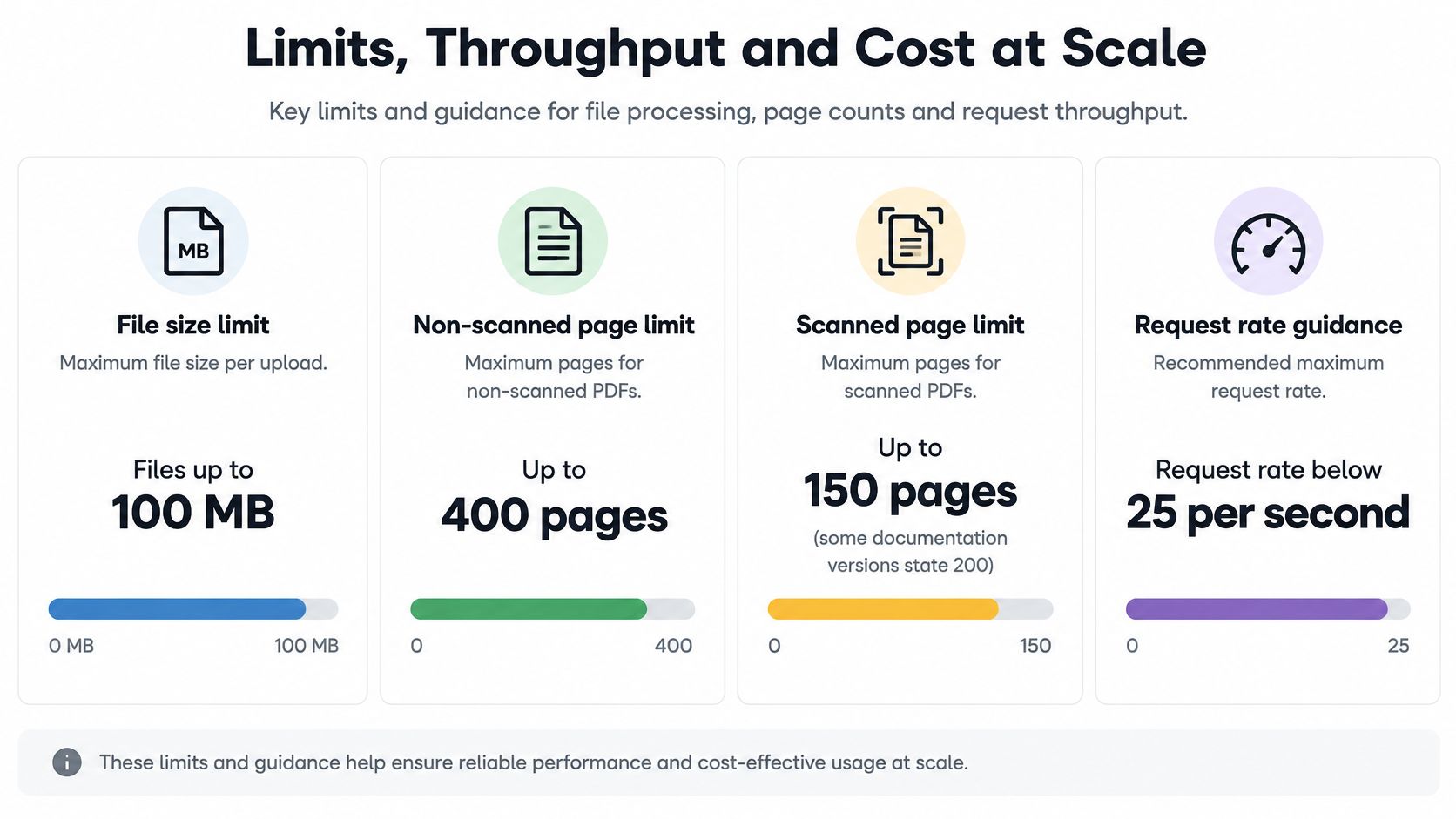
Published limits decide whether a clean prototype survives month end. The Adobe Extract API how-to documentation states files up to 100 MB, a maximum of 400 pages for non-scanned PDFs and 150 pages for scanned PDFs, request-rate guidance below 25 requests per minute, and a billing rule where one Extract document transaction covers up to five pages. It also specifies page dimensions generally requiring neither dimension to exceed 17.5 inches or fall below 6 inches.
| Limit | Published value | Planning implication |
|---|---|---|
| File size | Up to 100 MB | Split larger files before submission |
| Pages, non-scanned PDFs | Up to 400 | Split long reports into sections |
| Pages, scanned PDFs | Up to 150 (some versions state 200) | Split scanned batches earlier |
| Request rate | Below 25 per minute standard; 100 per minute listed for enterprise | Queue and throttle at peak hours |
| Billing unit | One transaction per five pages | An 8-page PDF uses two transactions |
| Free tier | 500 document transactions per month | Covers prototypes, not month-end volume |
| Page dimensions | No side above 17.5 inches or below 6 inches | Check scanner settings before ingestion |
Run the Billing Arithmetic
Page count drives consumption, not file count. An 8-page PDF uses two transactions because the first transaction covers up to five pages and the remaining pages consume another unit. Following that rule, a 400-page report uses 80 transactions. That's arithmetic from the billing unit, not a separate price quote, and it shows why long documents change your forecast fast.
The free tier also needs translating. 500 transactions at five pages each cover about 2,500 pages if every document packs perfectly into five-page blocks. In practice, rounding per document wastes capacity. Five hundred 5-page documents fit neatly. Shorter or longer documents don't.
Say your team processes 300 supplier invoices in a month and each invoice has eight pages once you include terms and delivery detail. That's 300 documents multiplied by two transactions, which equals 600 transactions. You've already exceeded the free tier before retries, test runs, or a second document type enters the pipeline.
Scanned files add another pressure. They hit the lower page cap sooner, so a large scanned batch needs splitting earlier. Splitting adds orchestration work and creates a billing question you should ask in advance. Are split parts billed as separate documents for rounding purposes? Do failed jobs or retries consume transactions? Get those answers before you model unit cost.
Throughput at Peak Hour
Rate guidance matters as much as price. At 25 requests per minute, sustained submission equals fewer than 1,500 requests per hour before processing latency, complexity, or account terms reduce real throughput. If you submit 20,000 documents, simple division gives 20,000 divided by 25, or 800 minutes. That's about 13.3 hours of continuous submission, and it assumes no throttling, failures, or queue delays.
Month-end accounts payable doesn't arrive evenly. Neither do KYC onboarding spikes or logistics document drops after a vessel arrives. You need queue-based ingestion, controlled concurrency, and retries with backoff so a peak doesn't turn into a backlog that blocks payments or customer activation.
A pipeline that works at average volume but fails at peak hour isn't automated. It's a delay with an API in front of it.
Use this workload formula for any vendor. First, count monthly pages. Second, round up per document using the vendor's billing unit. Third, add a retry allowance based on your failure rate in testing. Fourth, compare peak-hour submissions with the rate limit. That gives you a cost and capacity view you can defend.
Field-focused platforms bill differently. Each document structure has its own consumption rate, published and updated in real time at admin.matil.ai. One request counts as a single unit even when it includes several files or pages, provided they represent a single document under the chosen structure. In a batch, each distinct document unit generates an independent request. Run the same pages, peaks, and retry calculation against those rules instead of comparing headline prices.
Security, Compliance and Integration Options
Your compliance obligations don't disappear because an API did the reading. The European Commission guidance on application of the GDPR confirms the GDPR applies to personal-data processing regardless of the technology used, including automated processing and operations such as collection, storage, consultation, and use. Payslips, identity documents, bank statements, and KYC files stay in scope no matter which extractor produced the JSON.
Questions Every Vendor Should Answer
Ask for the same evidence from Adobe, cloud providers, field platforms, and any in-house design. Consistent questions make answers comparable.
- Data processing agreement: Who is controller, who is processor, and which subprocessors can access documents?
- Processing region: Where does extraction run, and where do logs, backups, and support copies live?
- Retention and deletion: How long are documents and results kept, and what deletion evidence can you obtain?
- Access controls: How do you restrict API keys, separate tenants, and review administrator access?
- Audit logs: Can you trace who submitted a document, who reviewed a field, and what changed?
Matil states GDPR compliance, ISO 27001, AICPA SOC standards, and an availability SLA above 99.99%. The terms give the client all rights over uploaded documents and the structured JSON results, while granting Matil a worldwide, non-exclusive, non-transferable, royalty-free license to host, copy and process documents only to provide the contracted service, solve technical problems, and ensure operation traceability. Matil also guarantees it does not use clients' personal or confidential document data to train public generative AI models or models shared with other clients.
Retention deserves its own line in the contract. By default, Matil keeps processed documents and results for 12 months for audit, traceability and technical support, then deletes them automatically. Align that setting with your retention schedule, because KYC evidence may need a longer audit trail than a purchase receipt. That trade-off sits at the center of enterprise document security. Traceability helps auditors. Longer storage increases exposure.
Adobe and the major cloud providers offer enterprise terms and regional options. Don't assume the default configuration matches your policy. Check subprocessors, support access, encryption, and whether extracted content is used for service improvement under your agreement.
Open-source libraries leave every control to you. That can be an advantage for strict data residency because documents never leave your infrastructure. It's also a burden. Your team owns encryption, access control, patching, logging, backup deletion, and incident response.
Integration Patterns
Adobe uses asynchronous job submission. You submit a job and retrieve a result package containing JSON plus optional renditions. SDKs help, but your application still manages polling or callbacks, package handling, retries, and mapping into records. The security consequence is easy to miss: that result package sits in your systems too, so the same retention and access rules you negotiated with the vendor now apply to your own storage.
Matil offers one endpoint to process all document types, with Normal synchronous processing for real-time integrations, Async processing that delivers results via webhook when they're ready, and Batch processing for hundreds of documents in a single request. It also fills the Excel and PDF templates the client defines with extracted data, which matters for compliance teams that still need a familiar document for review and sign-off rather than a raw JSON payload.
Cloud providers integrate through their own identity, storage, and billing stacks. That's efficient if you're already standardized on AWS, Azure, or Google Cloud. It creates friction when your document workflow spans several clouds or business units with separate accounts, because access policies and audit trails then live in more than one place.
Get the answers in writing before the pilot, then verify one during it: request a deletion receipt or an audit log export for a test document. A vendor that answers clearly on paper but can't produce evidence in practice will fail your next audit the same way.
Where Each Option Fits Best
Different workloads reward different strengths. Start from the record your team must produce, then work backward to the extractor.

For prototyping, Adobe's pricing page publishes a free tier of 500 Document Transactions per month for Acrobat Services APIs, including PDF Extract, in its current pricing offering published in 2026. That's a low-risk way to inspect structural output. It isn't evidence that production cost or throughput will fit.
Invoice Intake for Accounts Payable
Supplier PDFs arrive with different layouts, multi-page line-item tables, tax treatments, and payment references. Your team needs supplier, invoice number, dates, totals, tax amounts, and line items mapped into accounting fields. It also needs checks that totals reconcile before posting.
A field-focused platform fits best here because classification, schema mapping, validation, and exception routing are part of the job. Adobe can supply the table structure, but your team must build the supplier-specific logic that turns cells into payable records. The result you should measure is fewer manual corrections and faster approval, not prettier JSON.
Payslips for HR and Payroll
Payslips contain personal data and repeated earnings and deduction fields. Layouts are often structured, but employers and payroll providers vary labels and ordering. HR teams need named fields with traceability to the page so they can answer employee queries and audit a calculation.
A prebuilt payslip model with field-level review is practical. It reduces manual keying while keeping sensitive values checkable. If you use Adobe, plan to build the payslip schema, privacy controls, and review workflow around its paragraphs and tables.
KYC Onboarding
Identity cards, NIE documents, and passports need specific fields, format checks, expiry logic, and compliance evidence. A missed digit in an identity number can block onboarding or create a regulatory problem. Prebuilt ID models from Azure, Google, AWS, or a field platform fit better than raw structure extraction.
Adobe can read the text blocks and layout. Your team still has to decide which block is the document number, validate it, and store evidence of the decision. For regulated onboarding, I wouldn't accept that extra build unless you already have a mature identity verification layer.
Logistics Documents
Bills of Lading and customs declarations such as DUA arrive from many carriers and agents. Layouts differ, stamps and scans degrade quality, and fields such as weights, packages, SKUs, and quantities drive operational decisions. Custom schemas matter more than generic document structure.
A platform that supports custom structures and mixed-batch classification gives operations teams a direct path from PDF to shipment record. Adobe helps if you want searchable text and tables for analysts. It doesn't deliver a validated logistics record by itself.
Legal and Contract Review
Legal teams often care about headings, clause numbering, footnotes, lists, and reading order. They may want to republish content, feed search, or preserve structure for downstream analysis. Adobe fits this workload well because structure is the product.
If the goal shifts to extracting renewal dates, parties, notice periods, and obligations as validated fields, the balance changes. Then you need a schema and review process on top of the structure, whether you build it or buy it.
You can combine tools. One service can normalize structure while another extracts records. That hybrid can work for a large platform team, but it doubles integration, monitoring, vendor management, and failure handling. Choose it only when each tool has a clear job and the combined cost beats a single field platform.
Each fit should end in an operational result. Finance gets fewer correction queues. HR gets a clearer audit trail. Compliance gets evidence it can retrieve. Logistics gets records that match shipment systems without rekeying.
Choose the Option That Matches Your Workload
Make the decision in sequence, using your documents as evidence.
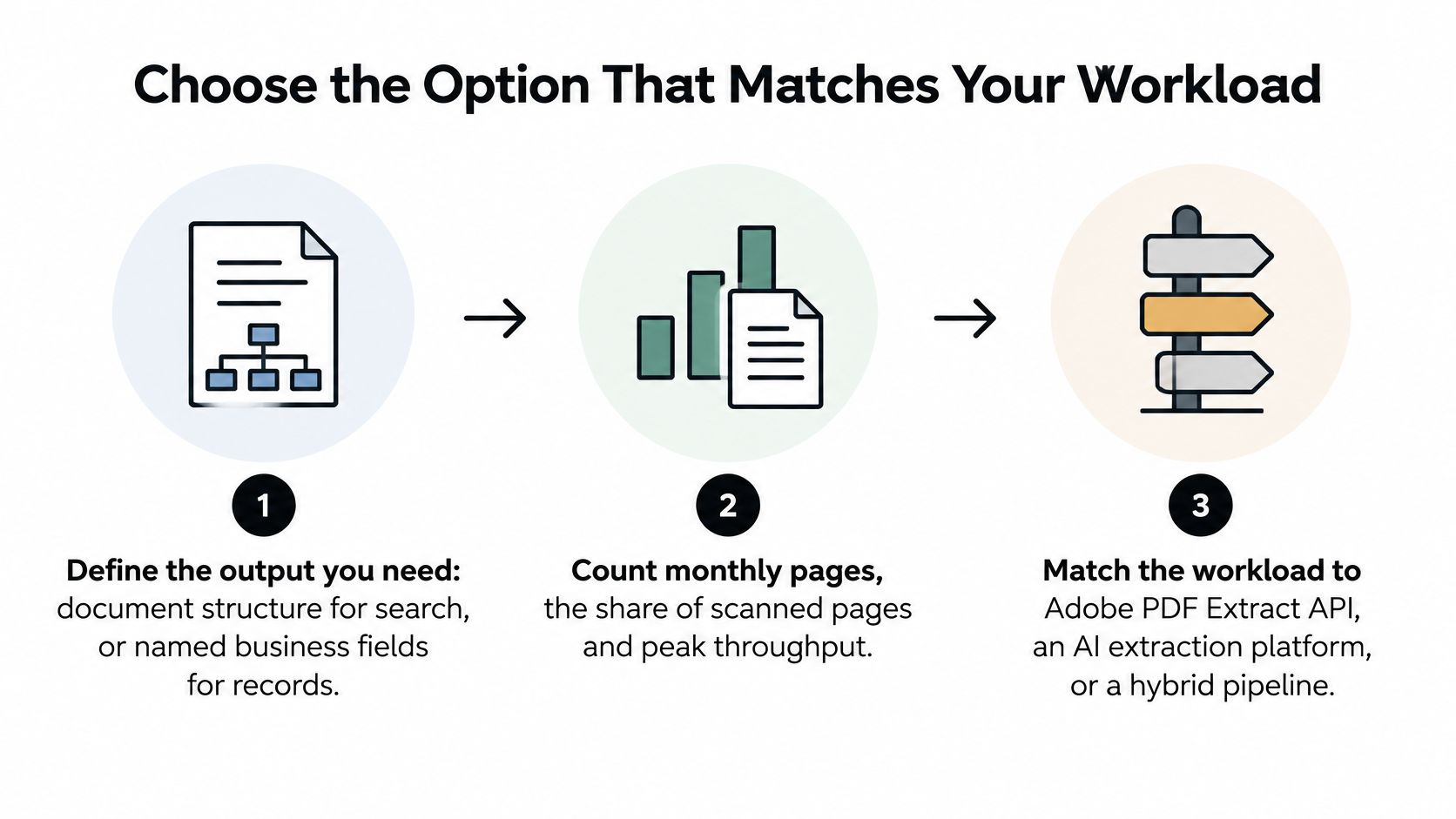
- Define the output: Decide whether you need document structure for search or named business fields for records.
- Count the workload: Measure monthly pages, scanned share, table density, and peak-hour volume.
- Check limits and billing: Compare page caps, transaction rounding, retries, and request rates with your peak.
- Verify compliance paperwork: Confirm the data processing agreement, region, retention, subprocessors, and deletion evidence.
- Shortlist two options: Run the same representative sample through both, including poor scans and page-spanning tables.
- Score at field level: Track corrected fields, reviewer time per document, failures, and records posted without touch.
Choose Adobe PDF Extract API when layout-aware structure is the goal and you'll build classification, schemas, validation, and review yourself. Choose a field-focused platform when the goal is validated records from invoices, payslips, KYC, and logistics documents.
For that second case, we offer Normal, Async and Batch processing through one API. Normal returns structured data instantly for real-time integrations, Async delivers results via webhook, and Batch accepts hundreds of documents in a single request for nightly imports and migrations. We don't use client documents to train shared models.
If you're evaluating this process, test Adobe and a field platform side by side on the documents that currently create manual work. The better choice is the one that leaves your team with fewer exceptions, not the one with the cleanest demo.
If your workload needs validated invoice, payslip, KYC, or logistics records rather than raw document structure, explore how Matil combines OCR, classification, schemas, and validation through one API. Run it against Adobe on your own sample set, compare field-level corrections and peak-hour handling, and choose based on the records your team can post without rework.


